
- Framing shots: I think I've gotten better at framing shots, all the elements in the sequences I've recorded so far are related to the scene. There is no particular improvement though as ability has stayed the same, perhaps I could try and use the filming space a bit better for my other scenes when filming.
- Using a variety of shot distances: I've demonstrated this in the first rough edit of my first recording, with a zoom shot on the main character Rose towards the end as well as a close-up of the clock during various parts of the scene, a mid-shot of the teacher and a long shot of the class. But it is still very early days and I have yet to demonstrate my ability to film the range of shots I wanted to use, for example, tilt shots which I wanted predominantly on the main character during the video.
- Holding a shot steady: with use of the tripod this has been made easier for me as opposed to last year when there were a few shaky shots of the scene. I do still need to develop the way in which I move the tripod head to ensure I get a smoother camera movement when filming shots such as zooms, pans or tilts. Hopefully this ability will improve if I practise more on the tripod I have or use another one just to see which one works best for me.
- Editing: I think I'm a lot more quick on my feet with the editing, doing as I go along so that I have more of an idea of how I want the actual editing process to go. I actually find it better as last year it was my first time using pretty much any editing software and being able to edit anything so it was more of a shock and it took me some time getting used to the basic functions e.g. just adding new titles or using the razor tool when needed, this became very time consuming, but this year although I still have a lot to learn I have more of an idea of how to use the software; making use of my own software at home (general Windows
Movie Maker which most PC's have) has enabled some preparation for me.

Monday, 6 December 2010
Evaluation of skills so far...
Technical skills:

First filming session

The first filming session took place after school today at around 3:45pm. It wasn't originally intended to be at this time of the day but at lunch time I couldn't find many of the cast members as they probably had gone to lunch and the time was running out too quick, disabling the chances of recording a worthwhile sequence.
Secondly, the original classroom I wanted to use was in use by one of the teachers as they were having an after school lesson so i had to relocate the cast to another classroom nearby.
The first scene was fairly easy to film, I instructed the classmates in the scene to act as if they were in a normal lesson, doing a test or exam paper with a few messing around in the background. First I started with a shot that showed the back of the classmates and the front of the teacher at her desk, during this part a classmate in the back row decided to throw some paper at her friend in front of her, to which they both laughed and the teacher told them to be quiet. I was fine with this part, I felt it was good in the way the actresses immediately responded to the "shh!" as this made it more effective in the way that it was sharp.
However half way through filming I had a few problems. The first was the zooming in of the title on the board. I had placed the camera all the way at the back of the class just so the full frame of the mise-en-scene showed on the screen, but as I tried to zoom in when the teacher was writing the title on the board it was not smooth at all, in fact it ended up looking very jerky and unprofessional, although I did attempt to re-film that part quickly towards the end of the session, I ended up with an even worse attempt.
I don't particularly know why I had so much trouble zooming in steadily, I think I just need to practise a bit more doing it smoothly like my first rough cuts of the clock ticking, or perhaps it was the positioning of the tripod (on top of a table)which made it unstable.
I'm not happy with all of the result, for example, the tripod head was very stiff so it was hard to turn to ensure a smooth camera movement every time i wanted to turn. I may need to think of borrowing the school tripod if this one continues to give me problems.
All in all, much more work is needed on the general technical skills of the first scene; this includes improving the smoothness of the camera movement and improving zooming in and out.
I expect to re-film on a day where most of the cast members have free periods, if the editing can not correct the visual problems. An ideal day would be Tuesdays as most of the sixth form have periods 3 & 4 free.
My test edit using Windows Movie Maker at home:
FEEDBACK
My teacher suggested that:
Secondly, the original classroom I wanted to use was in use by one of the teachers as they were having an after school lesson so i had to relocate the cast to another classroom nearby.
The first scene was fairly easy to film, I instructed the classmates in the scene to act as if they were in a normal lesson, doing a test or exam paper with a few messing around in the background. First I started with a shot that showed the back of the classmates and the front of the teacher at her desk, during this part a classmate in the back row decided to throw some paper at her friend in front of her, to which they both laughed and the teacher told them to be quiet. I was fine with this part, I felt it was good in the way the actresses immediately responded to the "shh!" as this made it more effective in the way that it was sharp.
However half way through filming I had a few problems. The first was the zooming in of the title on the board. I had placed the camera all the way at the back of the class just so the full frame of the mise-en-scene showed on the screen, but as I tried to zoom in when the teacher was writing the title on the board it was not smooth at all, in fact it ended up looking very jerky and unprofessional, although I did attempt to re-film that part quickly towards the end of the session, I ended up with an even worse attempt.
I don't particularly know why I had so much trouble zooming in steadily, I think I just need to practise a bit more doing it smoothly like my first rough cuts of the clock ticking, or perhaps it was the positioning of the tripod (on top of a table)which made it unstable.
I'm not happy with all of the result, for example, the tripod head was very stiff so it was hard to turn to ensure a smooth camera movement every time i wanted to turn. I may need to think of borrowing the school tripod if this one continues to give me problems.
All in all, much more work is needed on the general technical skills of the first scene; this includes improving the smoothness of the camera movement and improving zooming in and out.
I expect to re-film on a day where most of the cast members have free periods, if the editing can not correct the visual problems. An ideal day would be Tuesdays as most of the sixth form have periods 3 & 4 free.
My test edit using Windows Movie Maker at home:
FEEDBACK
My teacher suggested that:
- I should make the sound muted for the majority of the film after the teacher tells the student to 'shh!'. The silence should be replaced by the ticking sounds of the clock.
- The main character Rose should not be the last shot in the frame, instead the clock should be ticking last and maybe transition with a fade into the next scene
- If I'm going to use the warpy/dreamy effect near the end of the intro, it should be either more prominent and powerful or just be replaced by a fade instead.
Thursday, 25 November 2010
Production Schedule
 This is my rough production schedule, I have not finalised any dates yet but I'm hoping to do filming sessions on most weekdays and weekends for certain locations.
 Hopefully it will go as planned, but I will have to consider other complications such as changes in weather, snow for example, may prevent me from filming due to slippery surfaces when it melts and also may affect the continuity of the film and if I am re-filming scenes I realize that I need to inform the cast at least a day beforehand so that they can get the same costumes and/or props they were wearing and using in at the time.
PROPS

Props should be fairly easy to get and some of the cast will be able to provide their own such as: shades, jewellery and accessories.
WHY?:
- For the classroom scene, the use of technology is very important to convey the context of the music video. Paper and pens are obvious components which will act as part of the school mise-en-scene.
- I thought the cardboard sign is a good idea to be used to show the lyrics 'waving a sign'. In this scene the interpretation of the lyrics are literal, except it is not the 'sign' that the character wants to see. The use of a sign allows a clear representation of the character's misjudgement and creates a comic effect for the audience.
- Milshake/food will be needed during this scene so that it fits in with the setting of the scene which is at a cafe
- The laptop will be needed during this scene because Rose is seen looking at status' to do with love on a social networking site. This corresponds to the lyrics "Just once I'd like to feel the way that people say it feels, I heard that it's incredible, the ultimate right."
- The watch Kemi wears will be a symbolic prop, bringing the notion of time in the scene and reminding the audience that time is passing.
The shades give Kemi an aspect of 'coolness' to her character, like Lady Gaga's glittery glasses, this can be used as a form of voyeurism, helping the character to pull off their own persona and attitude via their costume. Jewellery and accessories that will be used on the main character will give a similar effect.
Tuesday, 23 November 2010

Monday, 22 November 2010
Time-Lapse Research
I decided to do some more research on time-lapses as it is a main aspect I would like to incorporate in the video.
The article is taken from:
http://www.highballblog.com/2010/08/make-time-lapse-video-edit.html
I decided to do some more research on time-lapses as it is a main aspect I would like to incorporate in the video.
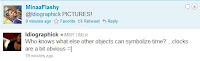 On Twitter I did get a great idea I could use: Pictures!
For example pictures of the protagonist from the past to present, I think this would work well because not only does it suggest that time has passed, it also suggests that a journey has taken place and thus opens the viewers mind up to another possible journey the main character will go through - perhaps a journey of relationships as opposed to life.
I'm pretty happy with the whole concept, but I'll probably keep exploring more ideas for it that I could use later =].
The article is taken from:
http://www.highballblog.com/2010/08/make-time-lapse-video-edit.html
- Weather changes - clouds forming and moving, mist and fog, rain, snow layer building up over time.
- Light sources - sunset and sunrise, sun's travel on the sky, the moon, the stars (especially Polaris time lapse), night transforming into day, beams of light penetrating the clouds, etc.
- Fire - a fire consuming the logs and ending in smoke or a fire that grows bigger as fuel is added.
- Tide - the ebb and flow of the ocean or sea.
- People - crowds moving in an open space.
- Construction work - a wall being build, a tall building being erected, crane booms swinging back and forth - all of a sudden a construction site becomes interesting to watch.
- Car traffic - cars running on the roads at night in fast forward mode look cool.
- Artwork - a painter (artist) creating an oil painting or crayon drawing. Computer graphics creations may fall into this category as well.
- Blooming flowers - a rose unfolding it's petals for instance.
- Moisture (water vapors) rising from a lake early in the morning.
- The road ahead shot from a moving vehicle - a rapid glimpse of an entire road trip/journey."
PRACTISE
The research has given me insight into just how much of choice of time-lapse I could have, for example, people and crowds may also be a good idea as well as traffic and light sources. I decided to try it out myself with a tripod and my pocket camcorder and here is the result, sped up.
Time-Lapse practice 1 from Imani Pratt on Vimeo
As you can see the recording is slightly shaky during the clip, that was due to my dog almost knocking down the tripod! But anyway this is more of a subtle time-lapse and I'm hoping to get a way better result than this when filming, slightly more dramatic - from night to day maybe.
Another filming technique I would love to have is stop-motion. I love the way this video effect kind of shocks the viewer in the way that it presents objects as being able to appear themselves. I would like to have this technique during the 2nd part of Kemi's rap/bridge part in the song, this would go nicely with the bit where she says "clock ticks the time away" and you hear the ticking in the background, except I think there could be a different object(s) that could I tried to get some suggestions for various objects/visuals that may symbolise time via facebook to help me out, but I still haven't discovered any of great use to me.
I decided to do some more research on time-lapses as it is a main aspect I would like to incorporate in the video.
Stop-Motion Practise from Imani Pratt on Vimeo.
Stop-Motion Practise from Imani Pratt on Vimeo.
 On Twitter I did get a great idea I could use: Pictures!
For example pictures of the protagonist from the past to present, I think this would work well because not only does it suggest that time has passed, it also suggests that a journey has taken place and thus opens the viewers mind up to another possible journey the main character will go through - perhaps a journey of relationships as opposed to life.
I'm pretty happy with the whole concept, but I'll probably keep exploring more ideas for it that I could use later =].
Sunday, 21 November 2010
Re-do of Target Audience Surveys


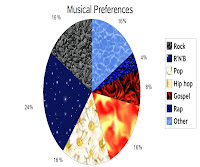 As you can see from the pie chart above, the percentage of those who have a preference in pop,rock and hip hop is pretty equal at 16% of those surveyed, with R'n'B reaching a staggering 24%. This tells me I have chosen a popular genre 'POP' which means the music for the music video will probably appeal to a large audience. However, it is more on the 'pop' side, as opposed to the R'n'B genre so this could be a disadvantage, but as the artists are generally POP/R'n'B, there is no reason why I could not bring in conventions and codes of R'n'B videos if that is what will attract a wider target audience.

As evidential, the data shows that magazines are not a common media product in the audience I have surveyed, but if I were to allow magazines to appear in the music video I could preferably go for common usage of magazines such as HEAT or OK as these seem to be fairly known.
In contrast, television programmes have a higher level of consumption, with soaps and comedies obtaining the highest percentage of all genres. Others include : cooking shows, sci-fi etc. Consequently the research suggests that if I were to have any of these type of programmes playing in the background of a scene in the music video that I should preferably opt for Soaps and Comedies, e.g. Eastenders, Coronation Street or My Wife and Kids/Friends as my target audience would be able to relate to what is shown on the screen.
Subscribe to:
Posts (Atom)